
Administrator's Plus v 6.3.04.01, GradebookSync v3.1.56.0, District Manager ver 3.0.45.00
This version coincides with AdminPlus.com Release October 16th, 2026
| Improvements | ||
|---|---|---|
| GPA and Quality Point Changes | When Edit GPA is updated in AdminPlus.com, the changes will by synced back to Classic AdminPlus. | |
| Calendar > Scheduling Rotation for Period Attendance | Users who are editing in Attendance in AdminPlus.com previously could not edit the Scheduling Rotation for Period Attendance in either Classic AdminPlus or AdminPlus.com. Updates have been made to allow users to edit the Scheduling Rotation for Period Attendance. | |
| APCom Edit Settings Log Updated | The APCom Edit Settings Log has been updated to track additional changes. | |
| District Manager to follow AdminPlus Edit Settings | District Manager has been updated to follow the settings to follow the AdminPlus Edit Settings. | |
| Feature Fixes | ||
|---|---|---|
| District Manager: SuperDB Default Value | The Default Value from a SuperDB Table was not previously syncing from District Manager to Classic AdminPlus. This issue has been resolved. When the Default Value is updated, it will properly update in Classic AdminPlus and as well in AdminPlus.com. | |
Improvements
GPA and Quality Point Changes
When Edit GPA is updated in AdminPlus.com, the changes will by synced back to Classic AdminPlus.
Calendar > Scheduling Rotation for Period Attendance
Users who are editing in Attendance in AdminPlus.com previously could not edit the Scheduling Rotation for Period Attendance in either Classic AdminPlus or AdminPlus.com. Updates have been made to allow users to edit the Scheduling Rotation for Period Attendance. Go to Attendance > Calendar > Enter Scheduling Rotation for Period Attendance.
APCom Edit Settings Log Updated
The APCom Edit Settings Log has been updated to track additional changes. The log now tracks the following:
- Edit change from AdminPlus.com to Classic AdminPlus
- Edit change from Classic AdminPlus to AdminPlus.com
- Edit will be automatically be switched back to classic temporarily when a user performs the following actions:
- Database transfer to an Active Year or Scheduling Year
- Report Card Transfer, with or without a Database Transfer, to an Active Year or Scheduling Year
- Discipline transfer to an Active Year or Scheduling Year
Switches the Scheduling Year to NONE
District Manager to follow AdminPlus Edit Settings
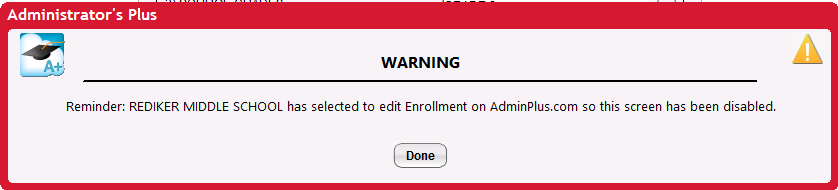
District Manager has been updated to follow the AdminPlus Edit Settings. When Enrollment, Demographics, Contacts, Portfolio, and SuperDB are configured to be edited in AdminPlus.com, users will be restricted from performing certain actions in District Manager, such as transferring students, editing field properties, and other related functions. When attempting to perform a restricted action, users will see a message similar to the following:
Feature Fixes
District Manager: SuperDB Default Value
The Default Value from a SuperDB Table was not previously syncing from District Manager to Classic AdminPlus. This issue has been resolved. When the Default Value is updated, it will properly update in Classic AdminPlus and as well in AdminPlus.com.