A Program groups prospective students together within the same grade level with the same list of requirements.
A group of prospects within the same grade level with a different list of requirements would qualify for an additional program.
For example: International students would have different requirements than domestic students. Boarding students would have different requirements than day students.
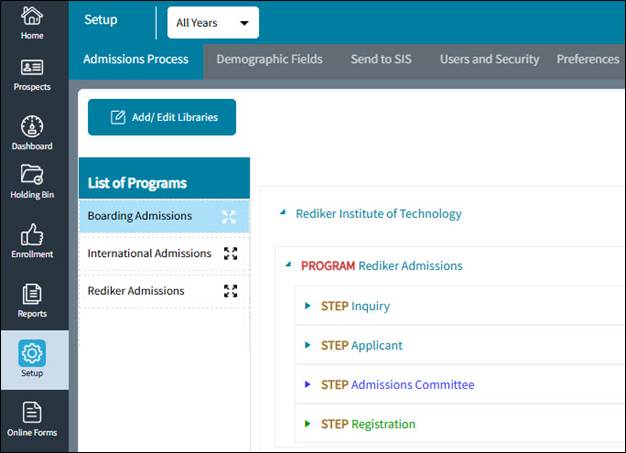
The list of Programs that have been created for your school can be found by clicking on the List of Programs tab.
To add a Program to your school, click on your school name on the right, then drag the Program from the list on the left so that it drops in under your school name.
If you need to create a new Program for your school, follow these steps:
- On the left navigation menu, click
 Setup.
 - On the Admissions Process tab, click Add/Edit Libraries.
The Libraries: Add/Edit dialog box opens.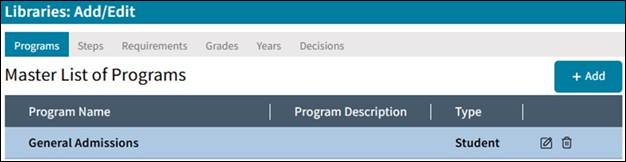
- On the Programs tab, click Add.
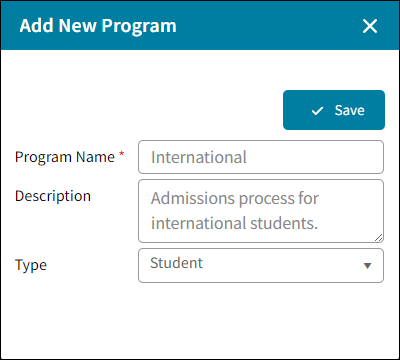
The Add New Program dialog box opens.
- Type a Program Name and, optionally, a Description.
- In the Type drop-down list, select whether the program is for staff or student applicants.
- Click Save.