
Overview
AdminPlus can track and report on a student’s disciplinary incidents. The Incident Codes (referred to in classic as Discipline Codes) are organized in 5 tabs for each of the code types used in reporting an incident: Incident Codes (A), Action Codes (B), Action Summary Codes (C), Served Codes (D), and Location Codes (E). Incident Codes can be viewed and edited under Setup Center > Libraries > Incident Codes.
Diagram of Codes
Fig 1: Diagram of Codes
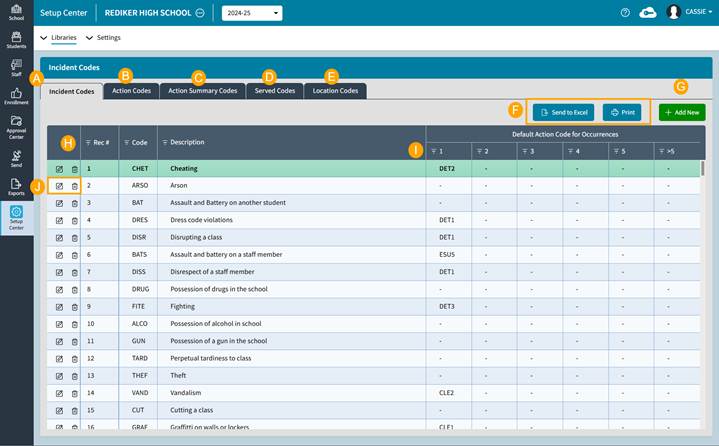
- Incident Codes categorize the student behavior.
- Action Codes are for the type of action taken based on the incident.
- Action Summary Codes (referred to as Penalty Codes in classic) are for reporting purposes to summarize the actions linked to Action Summary Codes.
- Served Codes are to track that the Action was applied.
- Location Codes are for tracking/reporting where and/or when the incident occurred.
- Send to Excel is used to export the table being viewed to Excel.
Print is used to print the table being viewed.
- Add New button is used to add a new Incident Code.
- Click on any column header to Sort the data by that column. Click to sort ascending, click again to sort descending.
- Click the Filter icon to filter the data. A checkmark above the filter indicates a filter has been applied.
- Click the Edit icon to edit that code. Click the Delete icon to delete that code.
Incident Codes
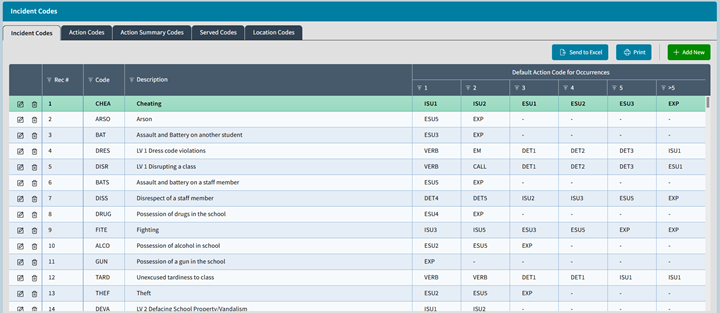
The Incident Codes, (known in classic as Infraction Codes), directly describe and categorize the student behavior being reported. These codes represent the rule or policy that the student has broken, for example, Cheating or Violating the Dress Code. It is made up of a 4-character code and a 40-character description. It can also be linked to Default Actions based on Occurrences if desired. For example, you can set up a code like Dress Code Violation to automatically link to actions that escalate in severity with occurrences from Verbal Warning to Suspension. An Incident code does not need to have any default actions; actions may be chosen manually when entering an incident.
NOTE: Setting up default actions that represent your printed policies helps to not only expedite data entry but also helps to ensure a consistent and fair application of the policies. This is because default actions will automatically add the action when choosing specific incidents.
An Incident Code may NOT start with a number, but it may contain a number.
Fig 2: Incident Codes
Action Codes
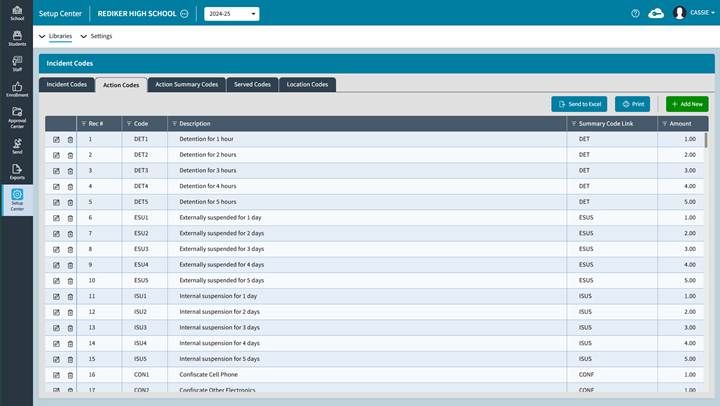
These codes represent the responses that the school administration will or did take to remediate the incident. An Action Code in turn can be used to accumulate (add to) Action Summary Codes. Like the Incident Codes, an Action Code is made up of a 4-character unique code and a 40-character description. These codes can be tracked or “summarized” by the Action Summary code that it links to. An Action Code need not be linked to a Summary Code. For example, a Verbal Warning action code can simply be an action that is not summarized by a summary code. Typically, you link an Action Code to an Action Summary Code when you want to track Outstanding/Total actions taken. For example, a Detention Action code is tracked by a Detention Summary Action Code, so that you can track outstanding/total Detentions. This also allows for an Attendance List to be printed.
NOTE: The Amount should represent the "units" that your school uses. For example, a Detention may represent a 1-hour unit or period of time, whereas a Suspension may represent an amount of 1 day of time.
Fig 3: Action Codes
Action Summary Codes
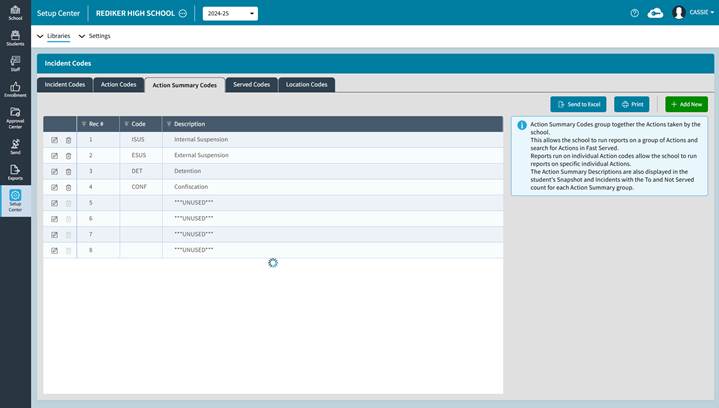
These are used to track and summarize the Action Codes. These codes, like Attendance Summary Codes, are broad and many Action Codes can and often will be linked to them. You can only have 8 Action Summary Codes. Typically, you need and want an Action Summary Code for any disciplinary actions that require a student to “participate” in an owed action and or that you want an attendance list for. The typical examples of this could include After School Detention, Special Saturday Detentions, etc. The codes are again four characters long with a forty-character character description (remember, codes may not start with a number).
Fig 4: Action Summary Codes
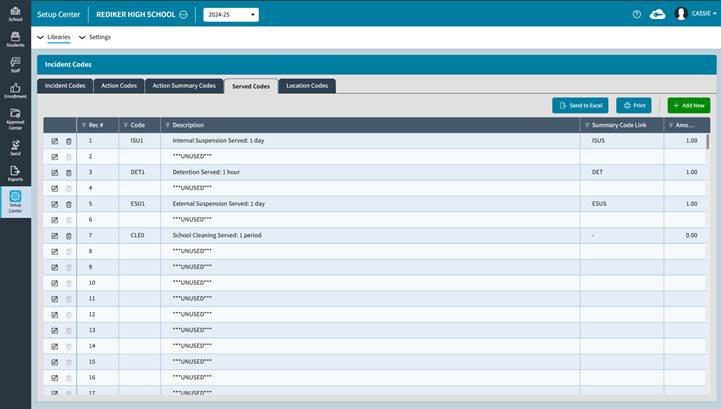
Served Codes
These codes are used to balance (or reduce) the Action Summary Codes. Where Action codes are used to accumulate an amount owed, Served Codes reduce that amount and are used to credit the student who served an action. For example, a student was written up for an incident, and the action taken was to assign a Detention. The Action would be linked to an Action Summary Code, indicating the student has an Outstanding Detention. The Served code would be used to credit the student when the Detention Action has been completed thus marking it as served and reducing the Action Summary by the amount.
NOTE: Served codes should reflect how your policies realistically carry out the actions. You need not have a 1:1 relationship between your Action and Served codes. For example, you may have Action Codes that can assign an amount of 3 to 5 Detentions. You need not have Served Codes that credits a student for 3 to 5 Detentions at once, especially if they are served one at a time and never three or more at a time.
Fig 5: Served Codes
Location Codes
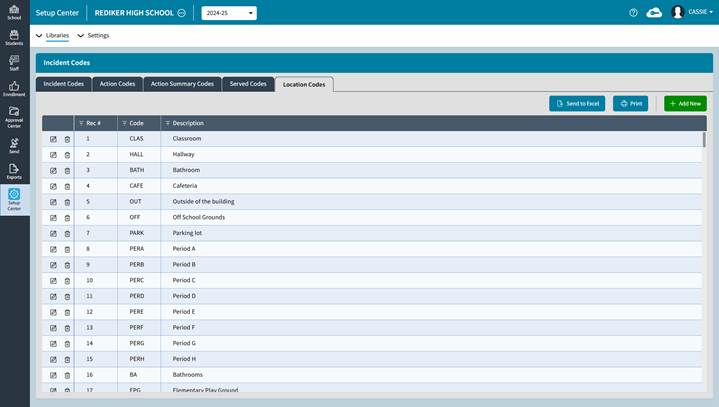
These are optional codes that can be used when entering an Incident into AdminPlus to indicate where and/or when an incident took place. You should customize this list to represent your campus and/or school day. Codes can be used in conjunction with one another to indicate both a place and a time.
NOTE: By having time or periods of the day in your Location Codes in addition to physical locations, you can use them to help indicate both when and where an incident has taken place. For example, “before school” and “parking lot” can be used together on an incident to indicate that the incident happened in the school parking lot before school.
Fig 6: Location Codes
Custom Incident Category Tables
If your school has a policy or needs to add additional information to an incident that is not covered by the codes, please refer to the article: Custom Incident Category Tables. These special tables allow for additional incident fields of data, for example, Victims, Admin Remarks, and more.