
The customer handles this entirely on their own end; We do not need to build a new integration, as the integration architecture is already built directly into our platform. To activate it, each individual customer school must obtain their own unique credentials directly from FACTS Management.
The PlusPortals Single Sign-On (SSO) feature provides a link from PlusPortals to FACTS so that you only need to log in to PlusPortals to access both and can access PlusPortals. Follow the steps below to activate single sign-on to FACTS.
TABLE OF CONTENTS
- Step 1: Request Your Keys from FACTS
- Step 2: Activating the Integration in Your PlusPortal Manager
- Step 3: Activating the link to FACTS
- Step 4: Expected Result
Step 1: Request Your Keys from FACTS
Every individual school campus has a unique data profile with FACTS. To bridge that data over to your portal, your school administrator must first obtain three specific cryptographic identifiers.
• Contact your FACTS Management Account Representative or standard FACTS Support.
• Ask them to provide the API Integration Credentials for a PlusPortals SSO connection.
• Ensure their team provides you with these exact pieces of information:
1. Institution Key
2. Hash Algorithm
3. API Key (sometimes referred to as a Secret Token)
Step 2: Activating the Integration in Your PlusPortal Manager
To set up FACTS SSO, follow these steps:
- On the navigation bar, click Setup > Integrations.
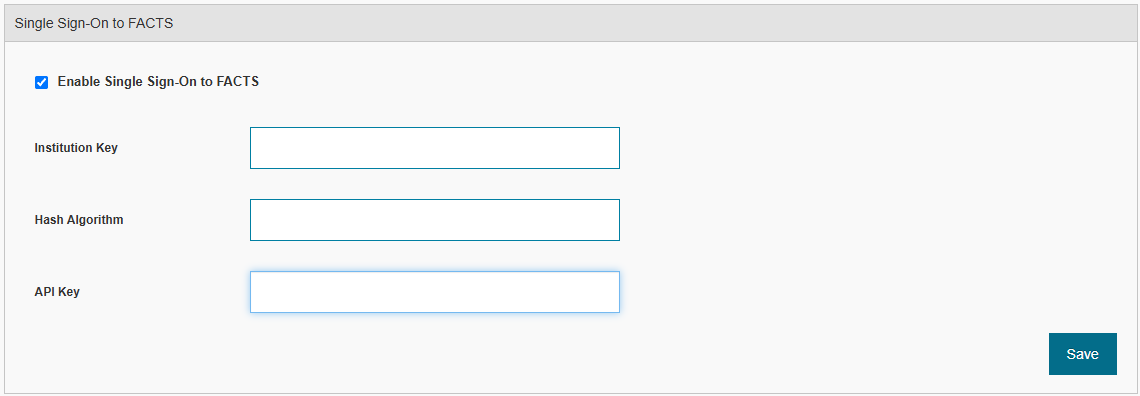
- Under Single Sign-On to FACTS, select the Enable Single Sign-On to FACTS check box.
- Type the Institution Key, Hash Algorithm, and API Key, and then click Save.
Step 3: Activating the link to FACTS
To activate the link to FACTS, follow these steps:
- On the navigation bar, click Permissions.
- Click Parents.
- Under Master Menu Customization, select the FACTS SSO check box.
- At the bottom of the Parents tab, click Save Settings.
Parents can now access the FACTS website through a link in PlusPortals.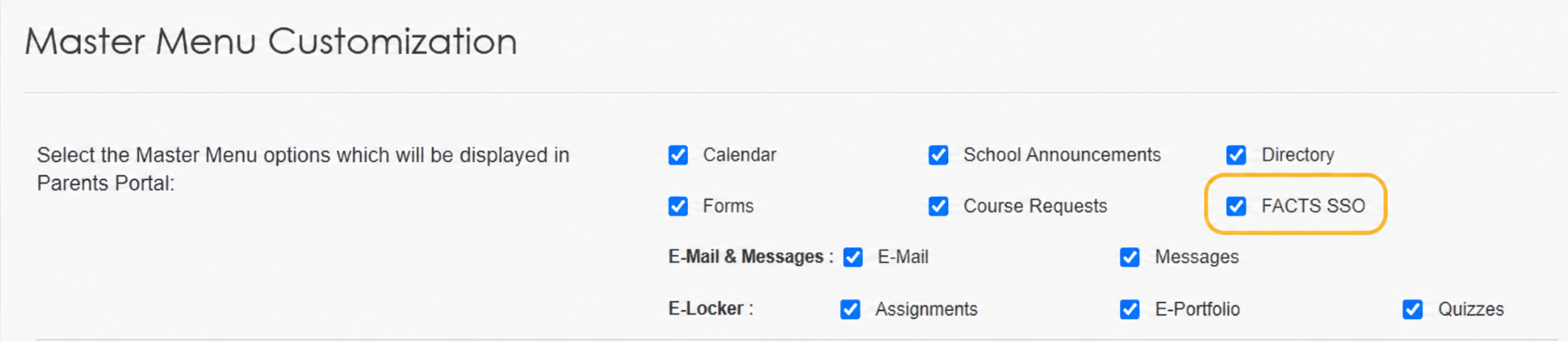
Step 4: Expected Result
Once saved, authorized users will immediately see a new FACTS option in their main navigation menu. Clicking this item will automatically authenticate them and open their personal FACTS portal in a secure window.
