
Widgets are drag and drop features that are used to display content on your website. Widgets are found in the Widget Panel accessed from the Left sidebar in the Editor.
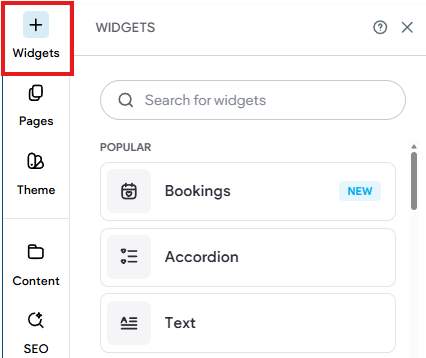
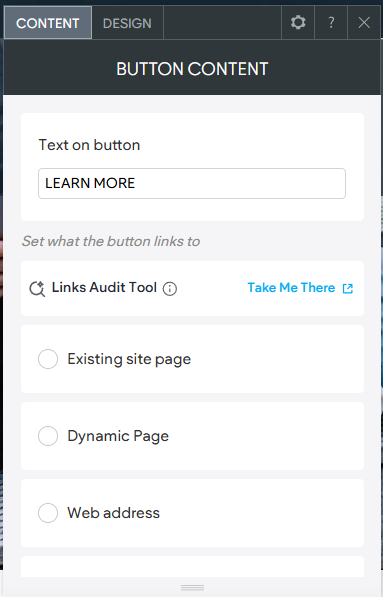
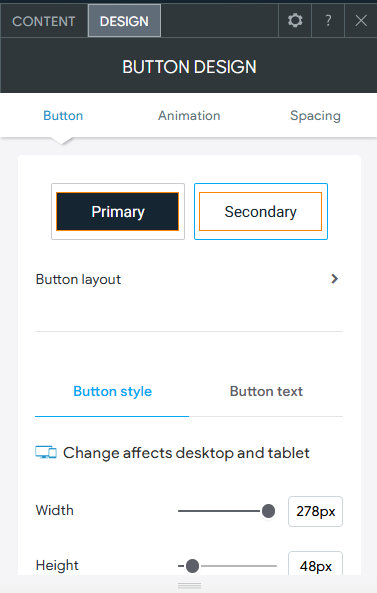
Widgets generally have 2 components to them: Content and Design. When you add a new widget to a page or edit an existing one, you are presented with editing either the content or the design of the widget. The exception to this, is the text widget which uses a standard rich text editing tool bar. The options found under Content and Design will vary by the widget being used. For example, a Button Widget only has 2 items for Content, the Text and the Link. Whereas a Photo Gallery Widget, has Images in the Content area, and each image would have other content properties like Title, Description, Button Text, etc. making it far more complex than a simple Button.
Content | Design | |
This is what you want the widget to display on the page. This can include but not limited to image(s), text, button text, links, etc. For example, in the Content area of the Button Widget we can set the Text that will display on the button as well as where the link of the button will lead visitors who click on it. | This is how you want your content to look on the page. This can include items like color, text size, etc. For example, in the Design area of the Button Widget we can set the color of the button and text as well as the size and more. | |
 |  |
Please keep in mind that widgets are created and used with specific content options in mind and not all widgets can or should be used for all purposes. For example, a Photo Gallery Widget cannot be used to display PDFs or Videos (as they are not images) only valid image types like JPG, PNG, etc.
Choosing the correct widget is often dependent of the type of content you are wanting to display.
Widgets that display images will also supply a content option for Alt-Text, be sure to fill it in.
Having trouble with a widget? Please contact us at support@rediker.com. Please provide the name of the widget, details, and a screenshot.